
Bridge your Mac storage

Your Mac can think now. Free, offline, yours.

Bridge Storage gives your Mac a private AI that understands your folders. Choose a folder, see what fills it, and ask about it in your own words. It all runs on your Mac, offline.

  • Free during launch
  • Apple silicon · macOS 14 or later
  • Ask needs macOS 26 or later

Illustration with the sample folder from the screenshots
Tidy a messy folder

Quietly included

Your Mac quietly gets its own private AI.

No account, no subscription and no bill for an AI service. macOS brings a small language model to your Mac, and Bridge Storage runs it there, offline. You come for your storage. You keep a Mac that finds your folders by meaning.

0accounts
Nothing to sign up for. No advertising, analytics or tracking.
~240MB
The model file, downloaded by macOS from Apple’s servers.
Offline
Once the model is on your Mac, Ask works without the internet.

What the AI does: it compares the meaning of folder names with your words. It does not open your files, it does not write text, and it can be wrong, so every answer shows the folder for you to check.

OrganisePro · free during launch

From mess to order, with Undo.

Organise moves the loose files in a folder into folders by kind, and by year for photos, videos and documents (the year each file was last changed), inside the same folder. You see a preview first, and nothing moves until you confirm.

Nothing is deleted or replaced. Undo puts the moved files back, except any you have moved or changed since.

Downloads
Tidy your own Downloads (opens in a new tab)

Preview: 12 files → 10 folders (9 new), by kind and by the year each file was last changed. Nothing has moved yet.

Now

12 loose files in “Downloads”

  • Holiday 2.jpgPictures/2026
  • Tax return 2025.pdfDocuments/2025
  • notes.jsonCode & Data
  • Backup.zipArchives
  • Setup Tool.dmgInstallers
  • Logo.sketchDesign
  • IMG_2041.HEICPictures/2026
  • Trip.movVideos/2025
  • Lease.pdfDocuments/2024
  • Voice memo.m4aMusic
  • Screenshot.pngPictures/2024
  • Invoice 0425.pdfDocuments/2025

No loose files left in “Downloads”.

After

10 folders inside “Downloads”

Press Organise to see the plan here first. Nothing moves until you confirm.

  • ArchivesNew1 file
  • Code & DataNew1 file
  • DesignNew1 file
  • Documents/2024New1 file
  • Documents/2025New2 files
  • InstallersNew1 file
  • MusicNew1 file
  • Pictures/20241 file
  • Pictures/2026New2 files
  • Videos/2025New1 file

2 other items stay where they are

Illustration with the sample Downloads folder from the screenshots. It runs in this page only.

Peace of mind

Know what’s on your Mac. Calmly.

Storage worry starts with not knowing. Bridge Storage turns a full folder into a clear picture, gathered by meaning, and leaves every decision to you.

  • It never deletes anything.

    No cleaning, no Trash, no surprises.

  • Files move only when you confirm.

    Organise shows a preview first, and Undo puts the files back.

  • Your files never leave your Mac.

    The scan, the AI and the results all stay on this Mac.

How it works

From a full folder to a clear picture.

Pick one local folder with the Mac’s own folder picker, then press Scan. Choosing a folder does not start a scan on its own.

  1. MapFree

    See where the space goes.

    A radial map and a matching list show what fills the folder you choose: the items in it on the inner ring, their contents on the outer ring. Switch between File size and Size on disk, and step into any folder.

    Size is shown, never a verdict. Where to Start and For Review help you decide what to look at first.
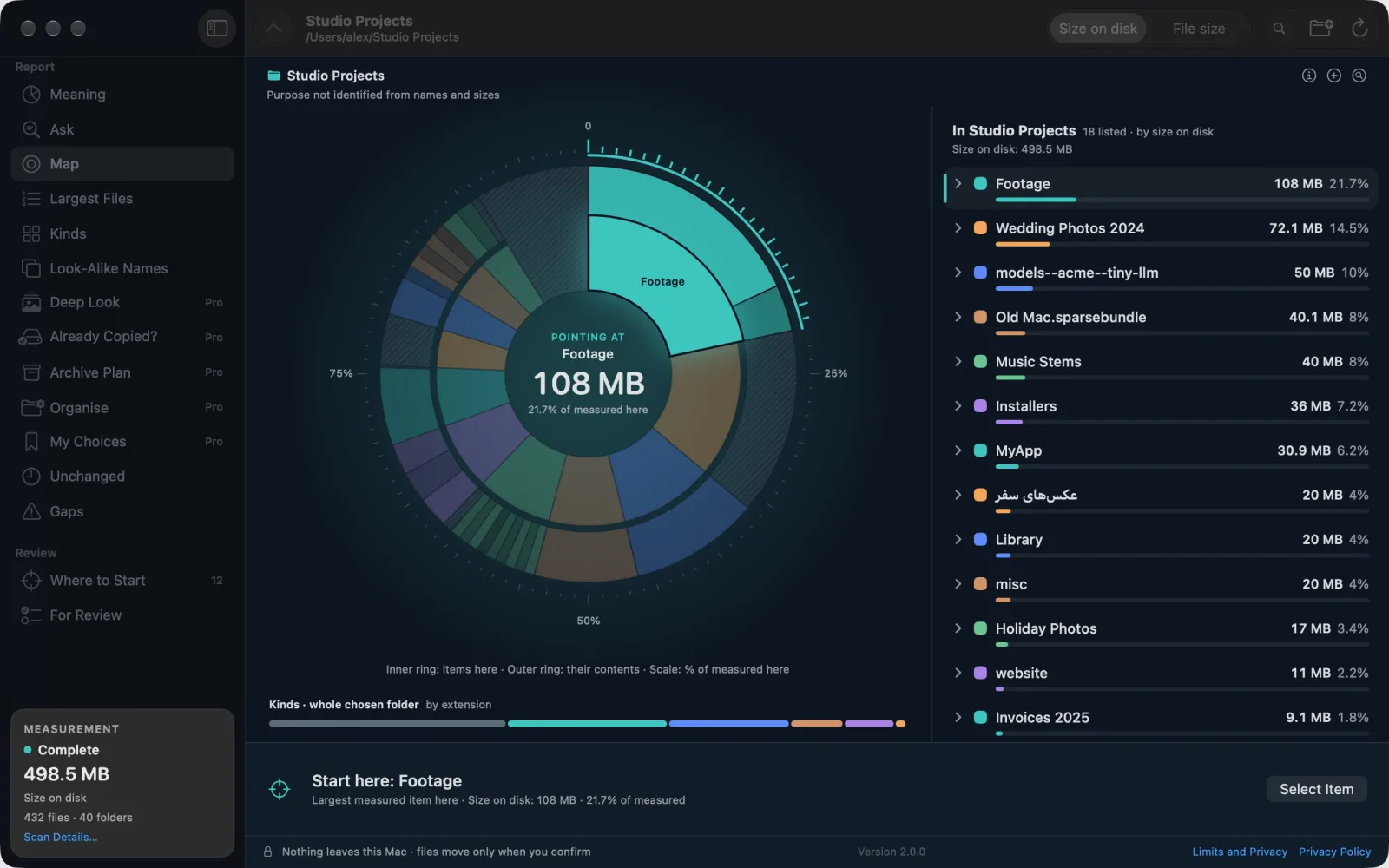
    Bridge Storage 2.0 in dark mode showing the Map of a sample folder, Studio Projects: a two-ring chart pointing at Footage, 108 MB or 21.7% of what was measured, beside a list led by Footage, Wedding Photos 2024 and models--acme--tiny-llm. The report is complete: 498.5 MB in 432 files.
  2. MeaningFree

    See what it is, not only where.

    Meaning gathers your folders by what they hold: photos, video, audio, design, documents, code, apps, backups, caches and more, even when they are spread across many places. It is the first thing you see after every scan.

    Groups are a guess from names, file kinds and folder layout. Sizes are measured.
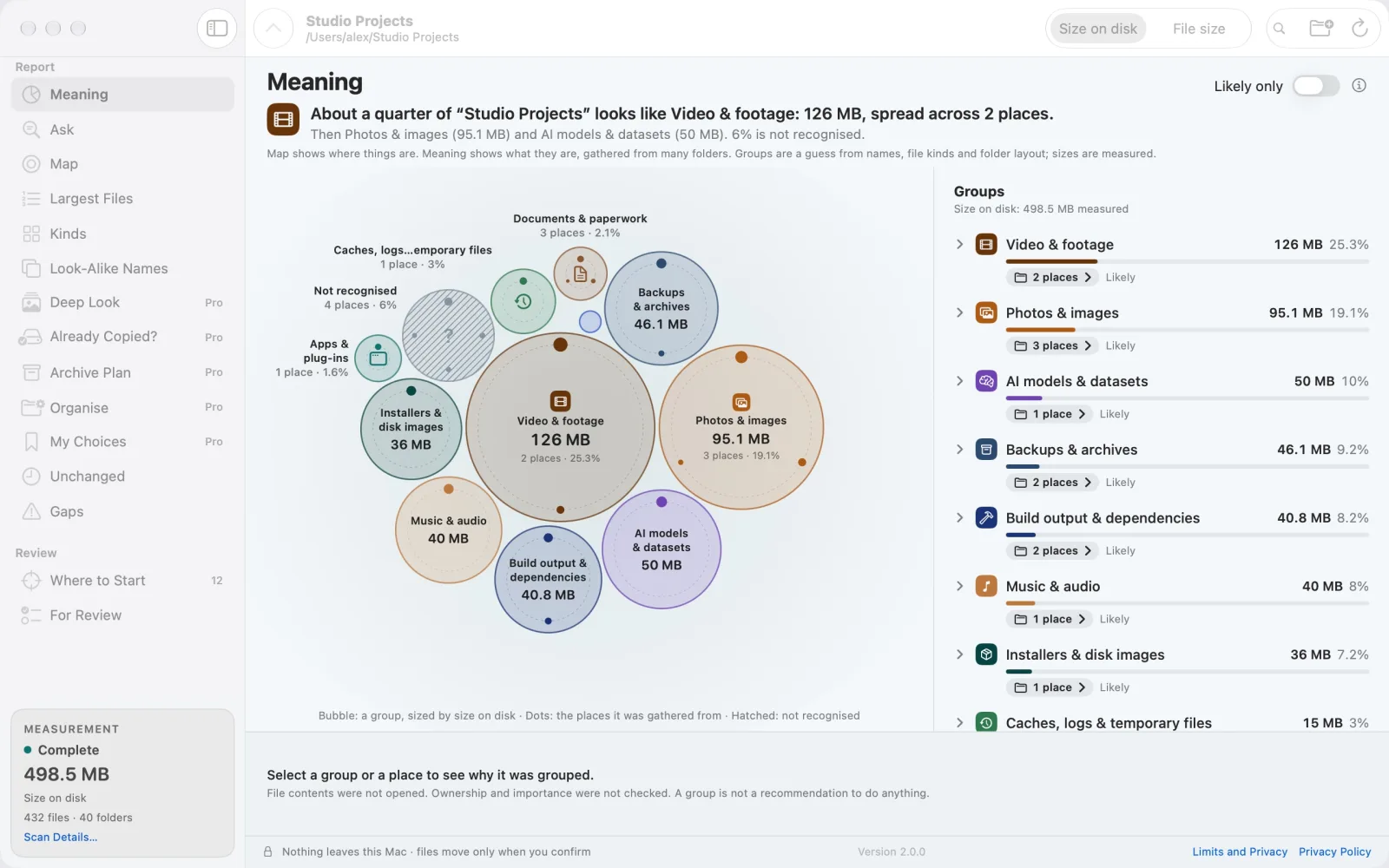
    The Meaning view of the sample folder Studio Projects: bubbles sized by size on disk for groups such as Video & footage (126 MB), Photos & images (95.1 MB) and AI models & datasets (50 MB), with the same groups listed on the right. A note says file contents were not opened.
  3. AskFree

    Ask in your own words.

    Type what you are looking for, such as “tax papers” or “holiday videos”, and Ask lists the folders whose names match by meaning, in English or Persian. Ask uses EmbeddingGemma, Google’s open model, running entirely on your Mac.

    Ask compares names only. It does not open your files, it does not write text, and it can be wrong. Needs macOS 26 or later.
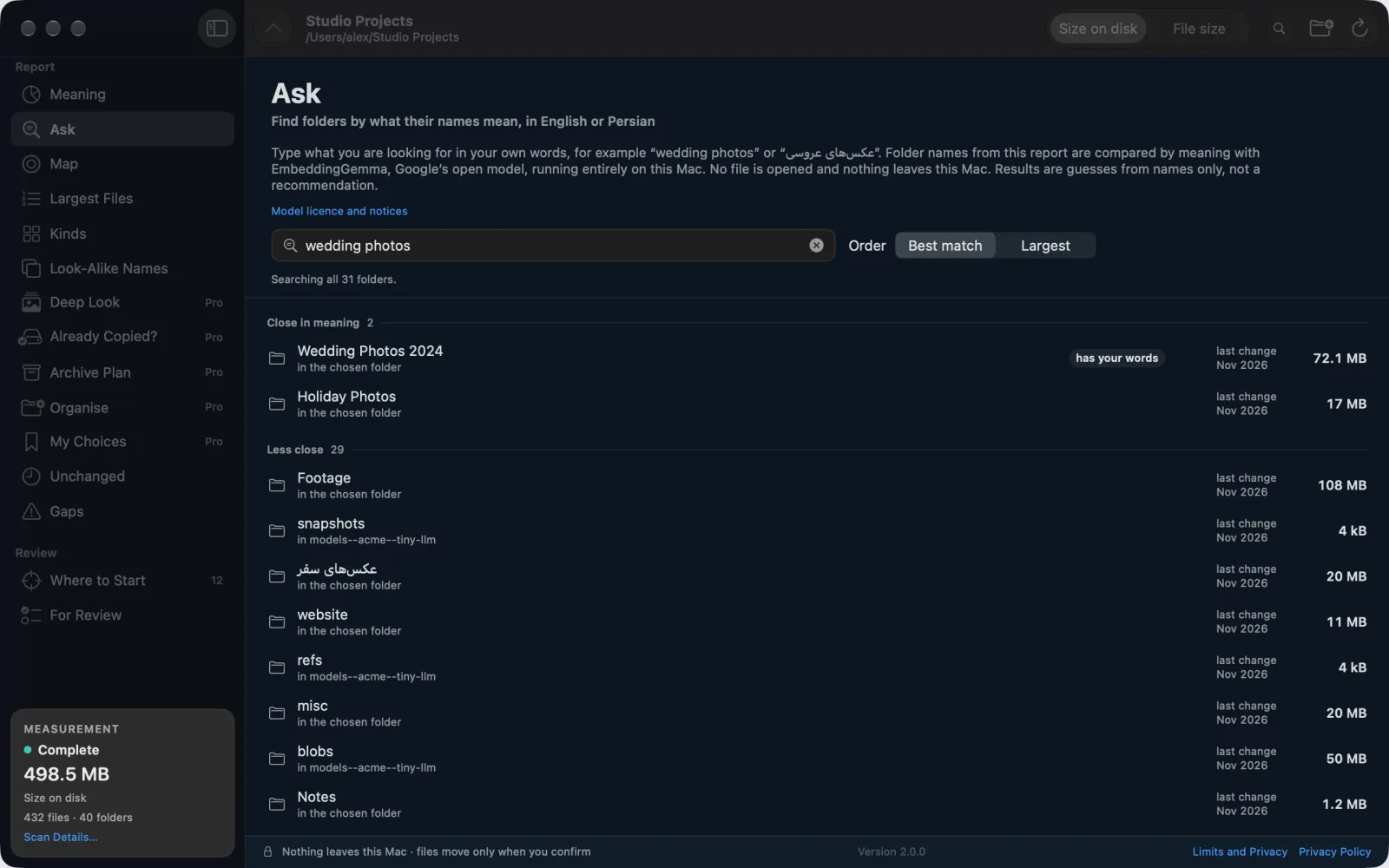
    Ask with the words “wedding photos”: Wedding Photos 2024 and Holiday Photos are listed as close in meaning, followed by less close folders. The page says folder names are compared by EmbeddingGemma, Google’s open model, running entirely on this Mac.
  4. Deep LookPro · free during launch

    Find the look-alike photos.

    Deep Look finds copies saved again, edited versions and burst shots. It opens your photos only after you agree, compares them on your Mac, and changes nothing.

    Results stay in memory only. Nothing is saved or sent.
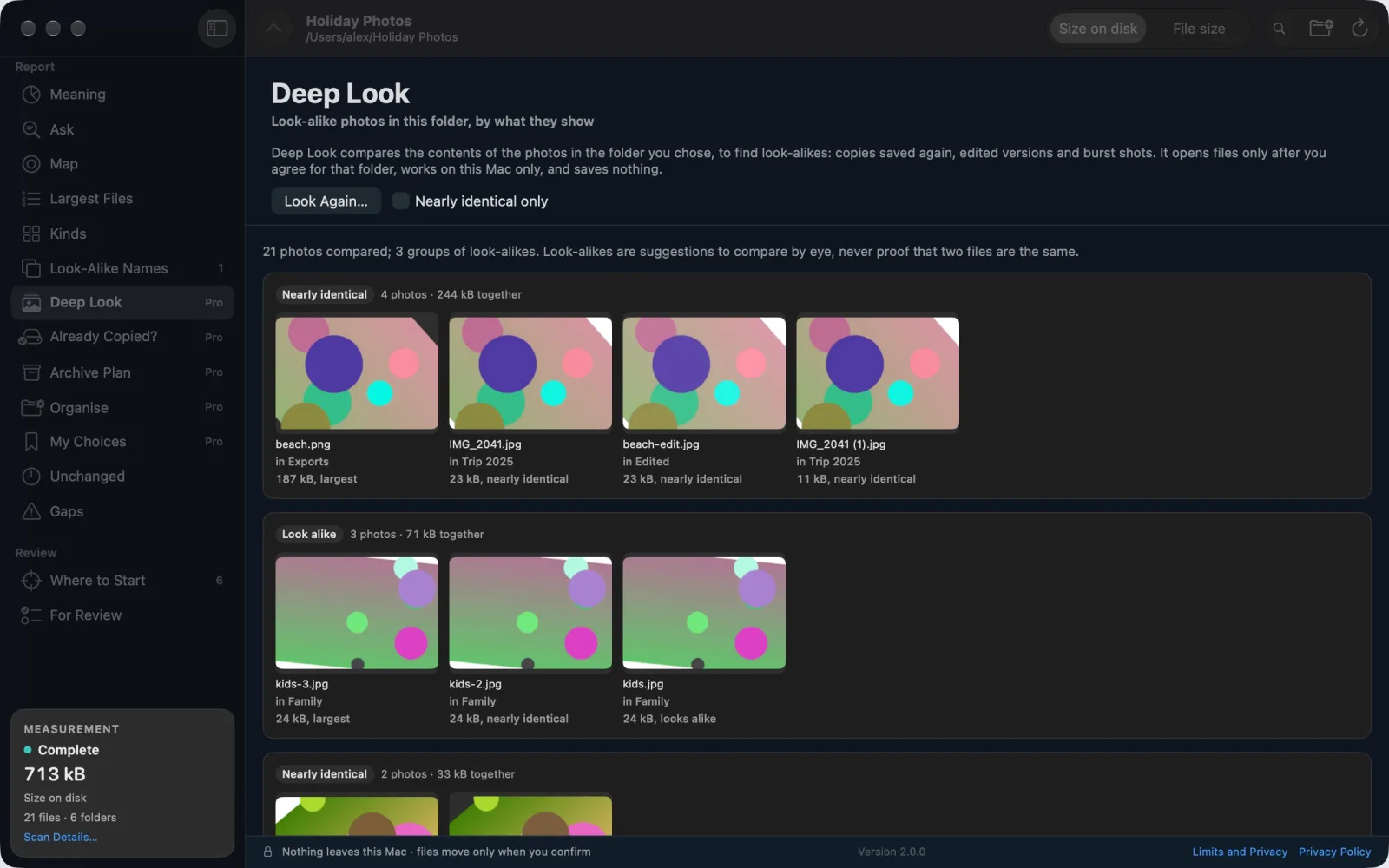
    Deep Look for a sample Holiday Photos folder: 21 photos compared and grouped into look-alikes, such as four nearly identical copies of one image saved in different folders, each shown with its name, folder and size.
Bridge Storage 2.0 in dark mode showing the Map of a sample folder, Studio Projects: a two-ring chart pointing at Footage, 108 MB or 21.7% of what was measured, beside a list led by Footage, Wedding Photos 2024 and models--acme--tiny-llm. The report is complete: 498.5 MB in 432 files.The Meaning view of the sample folder Studio Projects: bubbles sized by size on disk for groups such as Video & footage (126 MB), Photos & images (95.1 MB) and AI models & datasets (50 MB), with the same groups listed on the right. A note says file contents were not opened.Ask with the words “wedding photos”: Wedding Photos 2024 and Holiday Photos are listed as close in meaning, followed by less close folders. The page says folder names are compared by EmbeddingGemma, Google’s open model, running entirely on this Mac.Deep Look for a sample Holiday Photos folder: 21 photos compared and grouped into look-alikes, such as four nearly identical copies of one image saved in different folders, each shown with its name, folder and size.

Screenshots from version 2.0, with sample folders.
Also inside

Quiet helpers for the questions that come next.

  • Already Copied?

    Shows which files already exist, with exactly the same contents, in a second folder such as a backup drive.

    Pro · free during launch
  • Archive Plan

    Lists what has not changed for a while, by meaning, as a plan for copying it to another disk. It moves and copies nothing.

    Pro · free during launch
  • My Choices

    Remembers your Keep and Review later marks on this Mac, only if you switch it on. See and erase them at any time.

    Pro · free during launch
  • Largest Files, Kinds and more

    Largest Files, Kinds, Look-Alike Names and Unchanged: what is biggest, what kind it is, what looks like a copy by name, and what has not changed for a year or more.

    Free
  • Where to Start

    Where to Start and For Review help you decide what to look at first. Reveal any item in Finder when you are ready to act yourself.

    Free
  • Gaps, not guesses

    Unreadable items are counted as gaps, and partial or cancelled scans stay labelled, so an incomplete report says that it is incomplete.

    Free

Launch offer

Free during launch. Yours to keep.

Bridge Storage 2.0 is free, with every feature unlocked. There is nothing to buy and no subscription. Download it during launch and the Pro features stay yours.

In a later version, Pro becomes a paid upgrade for new users. If you download Bridge Storage before then, or already have it, you keep these Pro features without paying.

Free

  • Map
  • Meaning
  • Ask
  • Largest Files, Kinds, Look-Alike Names, Unchanged
  • Where to Start and For Review

Pro, included during launch

  • Deep Look
  • Already Copied?
  • Archive Plan
  • Organise with Undo
  • My Choices

Privacy

Private and safe by design.

Your files never leave your Mac. The AI runs offline. The only download is the model file, from Apple’s servers. Nothing ever connects to us.

Apple’s servers

Deliver the model file (about 240 MB) to macOS, which keeps it up to date. macOS’s App Store service also checks what your Apple Account owns.

Your Mac

  • Your folders
  • Bridge Storage
  • The AI model

Scans, questions and results stay here.

Bridge HQ

No connection. No account, analytics or tracking.

  • One chosen local folder

    It works on one folder you choose. It refuses the whole disk, volume roots, your home folder, network volumes and cloud storage locations.

  • Names, not contents

    A scan reads names, sizes, file types and dates; it does not open your files. Deep Look and Already Copied? open files only after you agree, for that folder only.

  • Only Organise moves files

    Organise moves loose files into folders inside the same folder, on the same disk, never over an existing file. Undo puts them back, except any you have moved or changed since.

  • Kept on your Mac, only when you use it

    It saves no scan history. Only the Organise Undo list and, if you switch it on, My Choices are kept, in the app’s own storage on your Mac. You can erase both.

  • Measurements, not promises

    It does not promise reclaimable space or a faster Mac: shared data, snapshots and changing files can make folder sizes differ from physical storage use.

  • No network access of its own

    No account, advertising, analytics, crash-reporting service or third-party SDK. The app does not request network access of its own.

Read the privacy policy (opens in a new tab)

Questions

Questions and answers

Still need help?

Use the contact page, choose Bridge Labs and mention Bridge Storage. Include the app version, your macOS version, what you expected and what happened. Please do not send private files or complete folder paths.

Contact Bridge HQ (opens in a new tab)

Does anything about my files leave my Mac?

No. Bridge Storage does not collect or transmit scan data, folder or file names, file contents or anything you type. It has no account, advertising, analytics or tracking, and no network access of its own. macOS downloads Ask’s model from Apple’s servers, and each time the app starts, macOS’s App Store service tells it what your Apple Account owns of Bridge Storage, checking with Apple when needed. Nothing about your folders or your words is sent.

Is Ask a chatbot?

No. Ask compares the meaning of your words with the names of the folders in your report, using EmbeddingGemma, Google’s open model, on your Mac. It does not open your files, it does not write text, and it can be wrong, so every answer shows the folder for you to check.

What does the app download?

Only Ask’s language model. On macOS 26 or later, macOS downloads it (about 240 MB) from Apple’s servers when the app is installed or updated, or when you first open Ask, and keeps it up to date. macOS also keeps a prepared copy of the model (about 260 MB) in the app’s own cache folder, and may remove it when space is needed.

Why don’t I see Ask?

Ask needs macOS 26 or later. On earlier versions, from macOS 14, everything else in the app works.

Can it delete or move my files?

It never deletes or replaces anything. Only Organise moves files, inside the folder you chose, after you see the preview and confirm, and Undo puts them back. Archive Plan is only a plan: it moves and copies nothing.

Will it free up space?

Bridge Storage shows what fills a folder so that you can decide what to do. It does not promise reclaimable space or a faster Mac: shared data, snapshots and changing files can make folder sizes differ from physical storage use.

Can it scan my whole disk?

No. It works on one local folder you choose. It refuses the whole disk, volume roots, your home folder, network volumes and cloud storage locations, and reports other mounted or cloud locations met during a scan as gaps.

Is it really free, Pro included?

Yes. During launch, Bridge Storage is free with every feature unlocked, including Deep Look, Already Copied?, Archive Plan, Organise and My Choices. There is nothing to buy and no subscription. In a later version, Pro becomes a paid upgrade for new users. If you download Bridge Storage before then, or already have it, you keep these Pro features without paying.

Which Macs does it run on?

Macs with Apple silicon and macOS 14 or later. Ask needs macOS 26 or later.

Give your Mac its own private AI.

Free on the Mac App Store during launch. For Apple silicon Macs with macOS 14 or later; Ask needs macOS 26 or later.